GTOZero Open the solver

Free GTO poker solver

A free GTO poker solver that runs in your browser

GTOZero is a heads-up postflop solver that calculates on your own device, plus hand review, precomputed flop strategies and a trainer that grades every decision by EV loss. Nothing to install, nothing to pay.

Open the solver →

Opens the solver web app in your browser

What does a GTO solver do?

A GTO solver takes two ranges, a board, the pot, the stacks and the bet sizes you allow, then searches for a strategy neither player can improve on alone. The output is not one move but a frequency for every hand: how often to bet, check, call, raise or fold. GTOZero is an online poker solver that runs that search inside your browser, so you can test the exact spot you played instead of the closest chart.

What can you do with it?

Solve your own heads-up postflop spots

Enter both ranges, the flop (and a turn or river if you want a fixed runout), the starting pot, the effective stack and bet and raise sizes for each street. The calculation runs on your computer's CPU through WebAssembly — nothing is sent to a server to be solved. It stops at the target exploitability you set (0.3% of the pot by default) or at the iteration limit.

Study Spots: read results before you build a tree

Thirteen worked examples open instantly. Press ⚡ View results and the flop strategy appears straight away, so your first session can be about reading frequencies, equity and EV rather than settings. To change the ranges or follow the hand to the turn and river, Solve it yourself loads the same inputs into the solver.

Study Spot results on a dry A♥7♦2♣ flop: the big blind's 13×13 strategy grid, check 98.2% with small bets, and a breakdown of made hands and draws

Hand review: check a hand you actually played

Pick the situation (Open · Call, 3-bet pot or 4-bet pot), the seats, your two cards and the flop, then enter the actions in the order they happened. Each decision comes back as Best play, Acceptable or Review this play, with a Total loss in big blinds. Flop decisions use precomputed results; turn and river decisions are calculated on your device. Ranges come from the app's preflop charts, so there is nothing to type. The basis is online 6-max cash with 100bb stacks, heads-up pots only.

Hand review of A♠Q♠ on the button against the big blind on K♥7♠2♦: the 75% pot c-bet is graded Acceptable with a total loss of 0.020bb, next to the opponent's response

Flop study and Flop reports

For the main seat combinations of single-raised, 3-bet and 4-bet pots, all 1,755 distinct flops (suit-swapped flops counted once) have been solved in advance to a 0.3% target. Flop study shows one flop: action frequencies and a 13×13 strategy grid, and you can follow each action to the end of the flop. Flop reports averages all 1,755 flops, weighted by how often each one is dealt, grouped by high card, suits, pairing or connectedness. In these pots flop bets are fixed at 33% and 75% of the pot with 60% raises. Turn and river play is not stored — Open in solver calculates it from there. A small blind vs. big blind limped pot is also available with a free account.
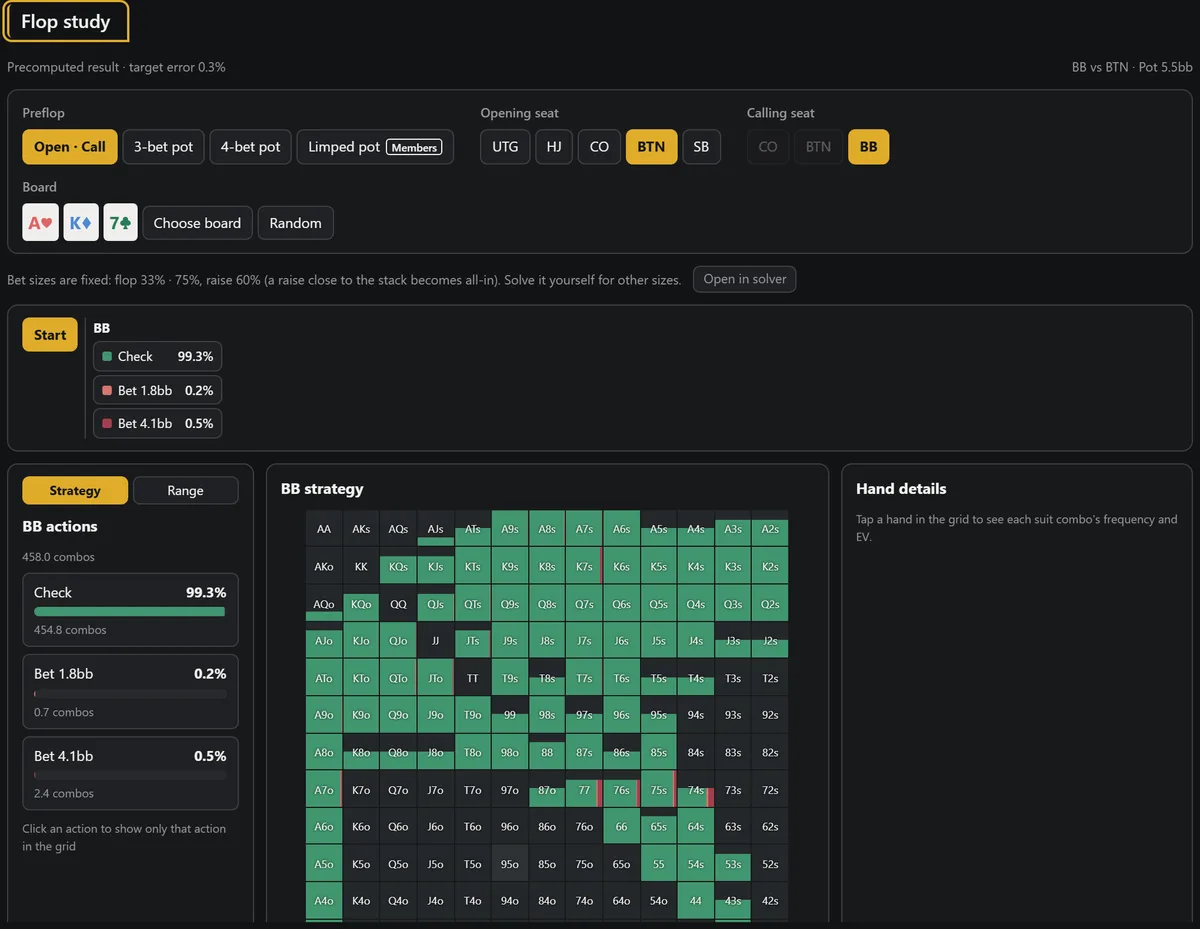
Flop study for a button open and big blind call on A♥K♦7♣: the big blind checks 99.3%, shown as action bars and a 13×13 strategy gridFlop reports grouped by high card: how often the button bets after a check on A-high through 3-high flops, beside a sortable table of all 1,755 flops

GTO Trainer: practice until it sticks

The trainer deals hands from solved spots in proportion to how often you would really hold them, asks for your action, and grades it by EV loss relative to the pot: Best play, Acceptable or Review this spot. A Daily Puzzle, a Review queue, Leak Finder and an optional RNG mode for mixed strategies are built in. From any result screen, Practice this spot turns your own solve into trainer questions.

GTO Trainer question with 8♥6♥ on A♥7♦2♣: checking is graded Best play, with each action's frequency and EV listed

Node locking: see what changes when a player deviates

On the results screen, Lock this node’s strategy fixes how one player acts at that point. Re-solve and compare before and after to see how the other player's strategy should shift when an opponent makes a mistake — for example, folding too often to a river bet.

How do you solve your first spot?

Open a Study Spot first, so you know what a finished result looks like. Then build your own spot through the five tabs on the left, in order:

  1. ① OOP Range — the out-of-position player's range — pick hands on the 13×13 grid or fill it from a seat.
  2. ② IP Range — the in-position player's range.
  3. ③ Board — the flop, plus a turn and river only if you want a fixed runout.
  4. ④ Bet Sizes — starting pot, effective stack and the bet and raise sizes for each street. Keep the defaults on your first try.
  5. ⑤ Run Solver — press Build Tree, start the calculation and watch the exploitability fall. When Solver finished! appears, open the results.

Chips are entered as whole numbers; the app suggests 10 chips = 1bb. If a tree needs more memory than the browser allows (about 3.9GB), switch Precision mode to 16-bit integer or simplify the tree.

Open the solver →

Video guide

Four short walkthroughs on the HoldemMaster YouTube channel, recorded on the same app.

Part 1 · 9:13 How to Use a Poker Solver for the First Time
What a solver does and doesn't do, opening a study spot (A♥7♦2♣) whose results appear without running a calculation, and the order to read the screen
Part 2 · 11:31 Poker Solver Results Explained: Frequency, Equity and EV
A grid cell vs. its combos, the whole range vs. your hand's row, and what frequency, EQ and EV each answer
Part 3 · 13:15 How to Run a Poker Solver on Your Own Hand
Write the spot down first, enter both ranges, pot and stack, bet sizes, build the tree, and check why the calculation stopped
Part 4 · 11:22 How to Study with a GTO Trainer (EV Loss, Hand Review)
How the GTO Trainer grades by EV loss relative to the pot, predict → compare → review missed spots, and widening to similar boards

What it does not do

Frequently asked questions

Is GTOZero free?

Yes. Custom solves, Study Spots, hand review, Flop study, Flop reports and the GTO Trainer are free and work without an account. Newer advanced features — the limped pot is the first — need a free account, which you can create with Google or Telegram. There is no paid tier.

Do I need to install anything?

No. The solver is a web app built on WebAssembly and opens in Chrome, Edge, Firefox or Safari. You can add it to your home screen if you want it full screen, but that is optional.

Where does the calculation run?

On your own device. Your browser downloads the solver engine and uses your CPU, so a faster computer solves faster. Precomputed flops for hand review and Flop study are downloaded only for the flop you open.

How accurate are the results?

Accuracy is measured as exploitability: how much an opponent could gain against the strategy, as a percentage of the pot. Custom solves aim for 0.3% by default, and the precomputed flops were solved to 0.3%. Results are only as good as the ranges and bet sizes you give the solver.

Does it solve preflop or multiway pots?

No. It solves heads-up postflop spots. For preflop the app has reference charts, which are consensus ranges from public material rather than solver output.

Does it work on a phone?

Yes. Study Spots, hand review, Flop study and the GTO Trainer all run on phones. Custom solves are best done on a desktop browser, especially on iPhone, where Safari limits the solver to one thread.

Do I need to sign in?

Not for the core features. Only the limped pot needs a free account. Signing in also lets your GTO Trainer history, saved ranges and bet settings follow you to other devices. Without an account you can save up to 10 ranges and 10 bet settings.

Who makes GTOZero?

The team behind the HoldemMaster YouTube channel. The solver engine is a fork of the open-source WASM Postflop project (AGPL-3.0), and the modified source code is public on GitHub.

About GTOZero

The engine is based on WASM Postflop by Wataru Inariba, released under AGPL-3.0. GTOZero is a localized and extended version with hand review, precomputed flop data and the trainer, and publishes the full modified source under the same license.

Why it is free: we want more players to enjoy hold'em through objective, solver-based analysis rather than guesswork. We want solver study to be open to every player, so we made the solver free and added Study Spots, video guides and a trainer that teach you how to read the results and apply them to your own hands. The goal is simple — to help as many players as possible get better at hold'em.

Source code on GitHub